The short version. Google says optimizing for AI Overviews is still SEO. Its generative features sit on top of the same core ranking and quality systems as classic search, and no special file or markup unlocks them. What does change is how you structure content for questions that split into sub-questions, and how you measure success when the click is no longer the only outcome. This guide combines Google’s own documentation, Seer Interactive’s click-through research and Kevin Indig’s two-country traffic analysis into one checklist you can score your pages against.
There is no AI Overviews hack
Google’s guide to generative AI features is blunt about it: the SEO fundamentals still apply, because AI Overviews and AI Mode are rooted in core Search systems. Two techniques explain how those systems build an answer.
The first is retrieval-augmented generation, which Google also calls grounding. The model pulls relevant, current pages from the Search index and writes its response from them, linking to the pages that support it. The second is query fan-out. The model fires several related searches at once, so one question becomes a set of narrower ones. Google’s own example is a person asking how to fix a lawn full of weeds. The fan-out might cover herbicides, chemical-free removal and prevention.
The practical consequence is that you are no longer competing for a single keyword. You are competing to be the page that answers the cluster of questions sitting behind it.
What the traffic data actually says
Most conversations about AI Overviews start and end with “traffic is down.” The better question is down compared to what, and why.
Kevin Indig’s analysis, published in his Growth Memo and on Search Engine Land in October 2026, uses Similarweb’s modeled monthly estimates for 10,000 domains each in the US and France. Between August 2024 and August 2026, organic search visits fell 13.2% in the US and 24.4% in France. Over the same period, paid search visits rose 21% in the US and 17.3% in France. AI referral traffic had the strongest growth rate of any channel, but it still amounted to only 2.85% of SEO traffic in the US and 2.44% in France.
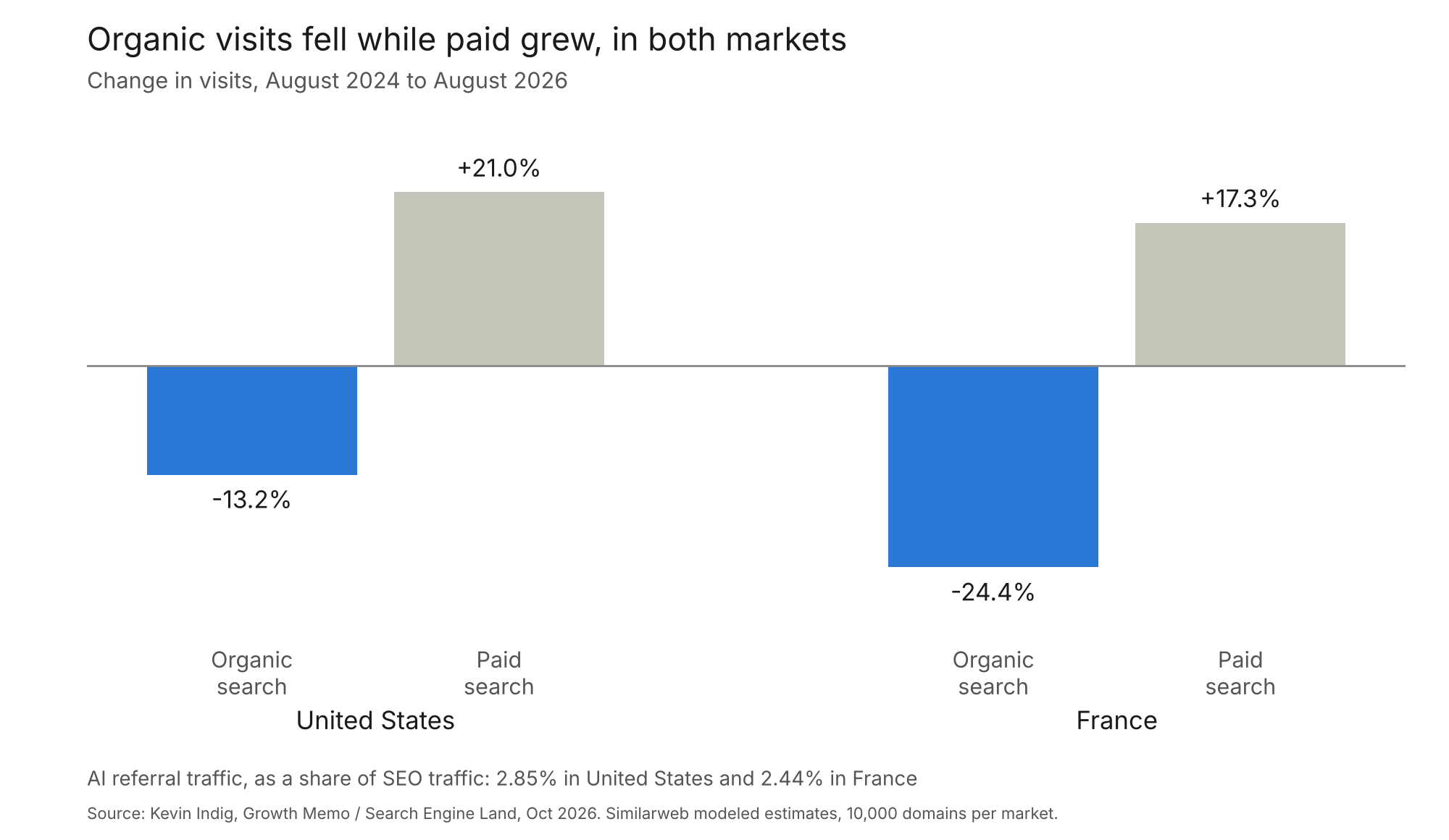
Two cautions from the analysis matter. These are modeled visits, and the data does not prove what caused the losses. France is a useful reminder: Google launched AI Overviews there only in July 2026, so most of the French decline came before them. Indig points instead to people using AI chatbots for tasks they once used search for, plus heavier advertising in results.
Seer Interactive’s study looks at the click itself. It covers 3,119 informational queries across 42 organizations, from June 2024 to September 2025. Organic click-through rate on queries with an AI Overview fell from 1.76% to 0.61%. Queries without one also declined, from 2.74% to 1.62%, so the whole results page is getting less clickable, not only the AI box. Brands cited inside the AI Overview earned 0.70% organic CTR against 0.52% for those that were not, a 35% gap, and 7.89% paid CTR against 4.14%. Seer is careful to say it cannot prove that citation causes the lift. Stronger brands may simply be more likely to be cited and clicked.
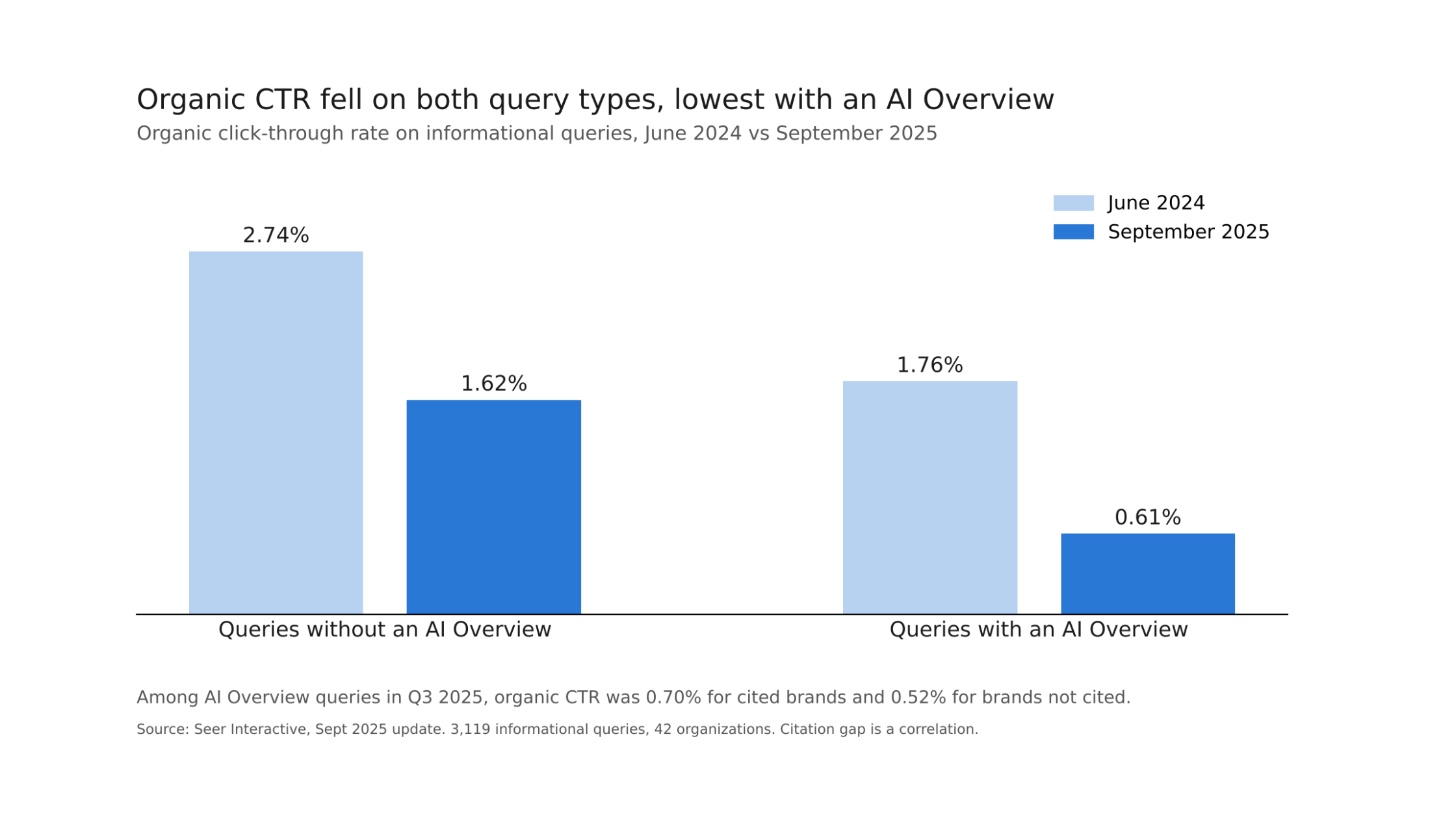
What I take from the two datasets together. They describe the same shift from two angles. Clicks are thinning out across the board, and a growing share of the decision happens before anyone reaches your site. That makes presence in the answer valuable in its own right, and it makes session counts an incomplete scorecard. I think about AI Overview performance as three gates: eligible (can Google show you at all), selected (does the answer draw on you) and valuable (does it turn into recognition, demand or pipeline). The checklist below follows those gates.
Use fan-out to cover a topic, not to multiply pages
Fan-out is the most useful idea in Google’s guide for anyone planning content, and also the easiest to abuse. Here is an illustrative fan-out for this article’s own topic. These are my modeled sub-questions, not Google’s internal queries, which nobody outside Google can see.
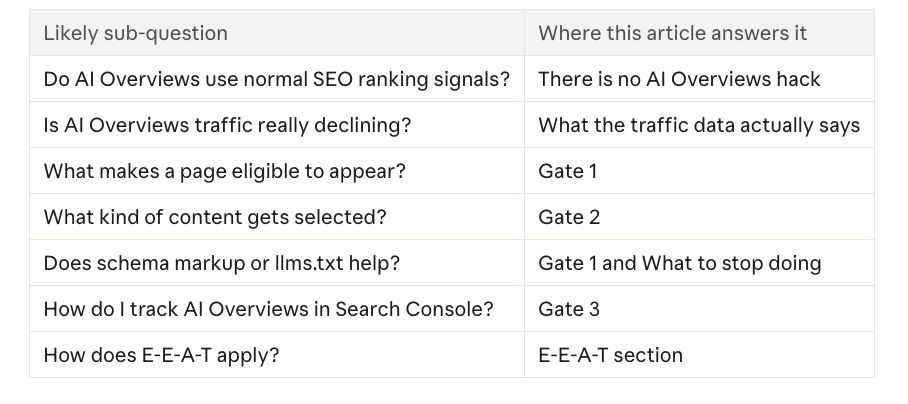
The rule Google attaches is important. Creating a separate page for every variation of a query, including fan-out queries, primarily to manipulate rankings or AI responses violates its scaled content abuse policy, and Google adds that it is ineffective long term. Its systems can also understand relevance without an exact keyword match, so you do not need a page per long-tail phrasing.
So use fan-out as a coverage test inside one page. Write the main question. List eight to ten sub-questions from People Also Ask, your Search Console queries and your sales calls. Check that each one is answered by a specific section, with evidence. If you cannot answer one from real knowledge, leave it out rather than pad.
The checklist
Gate 1: Be eligible
-
Indexed and snippet-eligible.
Google states that a page must be indexed and eligible to show with a snippet to appear in generative AI features. Check URL Inspection. Also review any nosnippet or restrictive max-snippet directives, because more restrictive permissions limit how your content can be featured.
-
Crawlable.
Public, crawlable content is what these systems work from. If your site relies on JavaScript, follow JavaScript SEO basics so your content actually renders.
-
Good page experience.
Pages should display well on every device, load without lag, and make the main content easy to tell apart from everything else.
-
Honest structured data.
It is not required for AI features and there is no special schema for them. If you use it, make sure it matches what is visible on the page and validates.
-
Images and video that earn their place.
Google’s AI features can pull in media, so follow image and video SEO guidance where visuals genuinely help the reader.
-
Business and product data.
Where relevant, keep Merchant Center feeds and Google Business Profile current, since AI responses can surface products and local businesses.
Gate 2: Be selected
-
Non-commodity content.
Google calls unique, first-hand content the factor most likely to shape long-term presence in generative AI search. A useful test: could a general-purpose AI model write this page from common knowledge? If yes, add something it cannot, such as your own data, a tested method or a real example.
-
Structure for people, not bots.
Clear headings and short paragraphs help readers. Google says you do not need to chop content into tiny pieces for AI, and that there is no ideal page length.
-
Fan-out coverage.
Run the coverage test above on your highest-value pages.
-
Evidence on the page.
Name your sources, show your method, include screenshots or numbers you can stand behind.
-
Visible trust signals.
Author, process and purpose should be clear. The next section covers this in detail.
Gate 3: Prove the value
-
Use the right report.
Search Console’s Generative AI performance report, introduced in June 2026, shows how your content appears in generative AI features on Google Search and Discover. Set a baseline now.
-
Track outcomes beyond sessions.
Compare pipeline, branded search demand and conversions alongside organic visits. If sessions fall while qualified demand holds, you are looking at a measurement shift rather than a business problem. If both fall together, investigate.
-
Be skeptical of tool claims.
Google warns that no third-party tool has access to its internal ranking or AI systems. Use tools if they help your workflow, but check their advice against official guidance.
E-E-A-T: the part most AI Overviews advice skips
E-E-A-T stands for experience, expertise, authoritativeness and trustworthiness. Google’s documentation makes three points that are easy to miss. E-E-A-T is not itself a ranking factor. Its systems use a mix of signals that help identify content with strong E-E-A-T. And of the four, trust matters most, with the others feeding into it. For topics that could affect health, finances, safety or society, which Google calls YMYL, the systems give even more weight to strong E-E-A-T.
Google gives a practical way to audit this, called Who, How and Why.
-
Who
created the content? Put a byline where readers would expect one, and link it to a real author page. Do not invent profiles, headshots or credentials. Google treats fabricated authorship as deception and a low-quality signal.
-
How
was it created? Explain testing methods and evidence where relevant, and disclose AI or automation where readers would reasonably ask.
-
Why
does it exist? The honest answer should be that it helps people who land on your site directly, not that it attracts search visits.
One detail deserves more attention than it gets. Google’s description of how quality raters judge main content centers on effort, originality, skill and accuracy, and it says that giving credit to other sources does not replace original effort. This post leans on Google, Seer and Indig, and crediting them is the right thing to do. But the part that makes it worth citing is the synthesis and judgement layered on top. The same applies to your content. Citations build trust. Original analysis earns the selection.
For enterprise teams, that translates into a few concrete habits:
- Pair a named practitioner author with a subject-matter reviewer on technical or regulated topics.
- Add a short methodology note to any post that makes a data claim.
- Link to primary sources, not to summaries of summaries.
- Update a page’s date only when the content has substantively changed. Google lists faking freshness as a warning sign.
- Keep an accessible About page and clear organization details.
Add your own finding here before publishing. One paragraph from your own Generative AI performance report or a test you ran, with a screenshot, is what turns this from a good summary into non-commodity content.
What to stop doing
Google’s guide lists several popular tactics that it says you can ignore for Google Search: creating llms.txt or other special AI files, breaking content into tiny chunks, rewriting pages in a style meant only for AI, chasing inauthentic mentions across the web, and over-investing in structured data. Creating an llms.txt file is harmless and will not help or hurt visibility in Google Search, which ignores it.
One honest caveat from my side: this is Google’s position about Google Search. ChatGPT, Perplexity and other assistants run their own retrieval, so test those separately before deciding what to drop everywhere.
Frequently asked questions
Is SEO still relevant for AI Overviews? Yes. Google says its generative AI features are rooted in its core ranking and quality systems, so established SEO practices continue to apply.
Do I need llms.txt to appear in AI Overviews? No. Google Search does not use it.
Do I need schema markup? It is not required for generative AI features and there is no special schema for them. Use it where it supports rich results, and keep it accurate.
How do I measure AI Overviews performance? Use the Generative AI performance report in Search Console, and read it next to pipeline and branded demand rather than sessions alone.
A 30-day plan
-
Week 1:
Audit eligibility. Check indexing, snippet permissions, rendering and structured data on your top pages.
-
Week 2:
Pick five pages that influence pipeline. Run the fan-out coverage test and add first-hand evidence.
-
Week 3:
Upgrade trust signals: bylines, author pages, methodology notes and primary sources.
-
Week 4:
Baseline the Generative AI performance report alongside pipeline and branded demand, then set a monthly review.