
Key takeaways
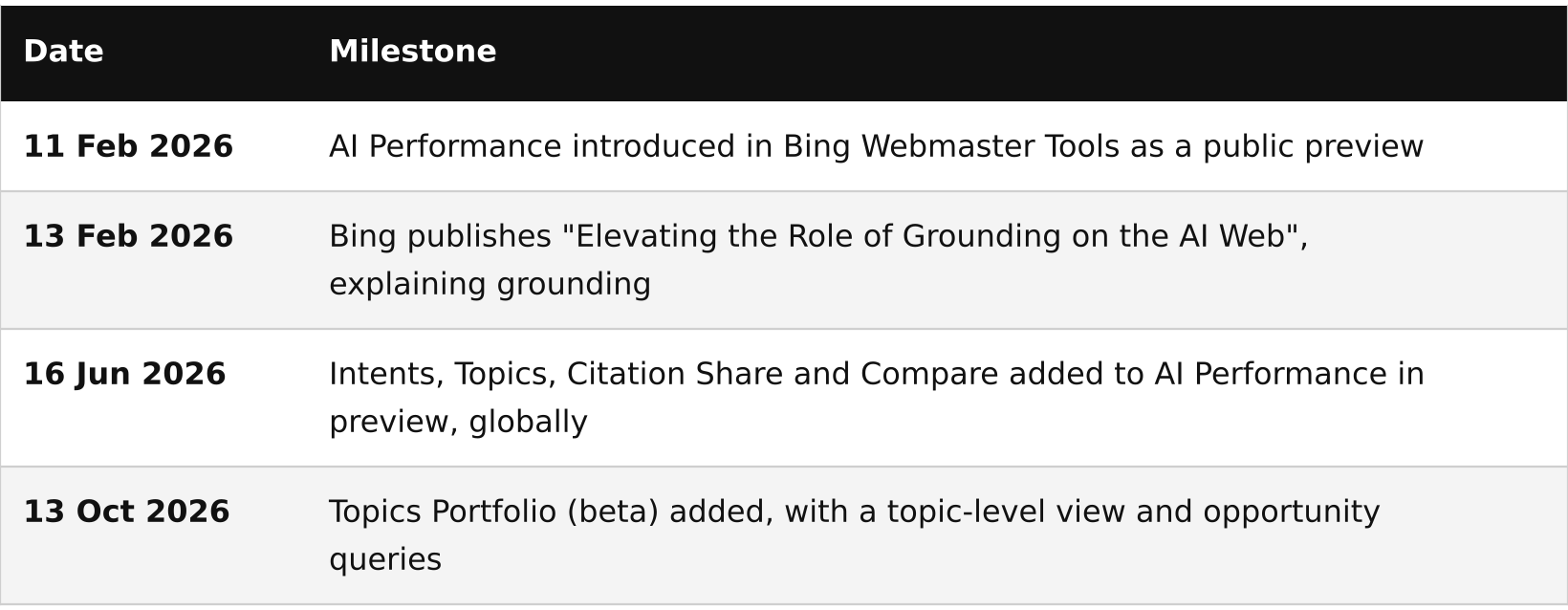
- What it is: Topics Portfolio is a beta tab inside the AI Performance report in Bing Webmaster Tools, announced on 13 October 2026. It sits next to Citations & Pages.
- What it shows: your grounding queries clustered into topics, with approximate Topic Size, Sites Cited and Queries for each.
- What is new: Top Opportunity Queries, the queries where other sites are cited and yours is not.
- How it fits: it builds on the June update that added Intents, Topics, Citation Share and Compare to the same report.
- The catch: classification is AI-generated, numbers are ranges, small sites may not see the tab, and it covers Microsoft’s AI surfaces only.
What Microsoft announced
On 13 October 2026, the Bing Webmaster team (Krishna Madhavan, Saral Nigam and Vivek Jain) announced a beta feature called Topics Portfolio inside the AI Performance report. It takes the grounding queries where your site appears and groups them into broader themes. Microsoft’s own examples are football, taxes and AI chatbots.
Grounding queries are the searches an AI system runs to collect source material before it writes an answer. Until now, the report listed them query by query, together with the pages cited for each. Topics Portfolio zooms out. It shows how your presence is spread across themes, how much demand each theme carries, how crowded it is and where your site has room to grow.
One detail worth underlining: everything in the view is personalised. The topics and the opportunity queries come from your own presence and activity in AI search, not from a generic industry list. Two sites will not see the same portfolio.
The road to Topics Portfolio
Topics Portfolio is the latest step in a fast build-out of AI visibility reporting inside Bing Webmaster Tools. The dates below come from Bing’s own blog archive.
What the June update added
The 16 June post, written by Krishna Madhavan, Meenaz Merchant, Saral Nigam and Trishna Shah, said the original report answered one question: where is my content cited in AI-generated answers? The four new capabilities were meant to explain why content is surfaced, in which subject areas, how presence compares with other cited sources and how it changes over time.
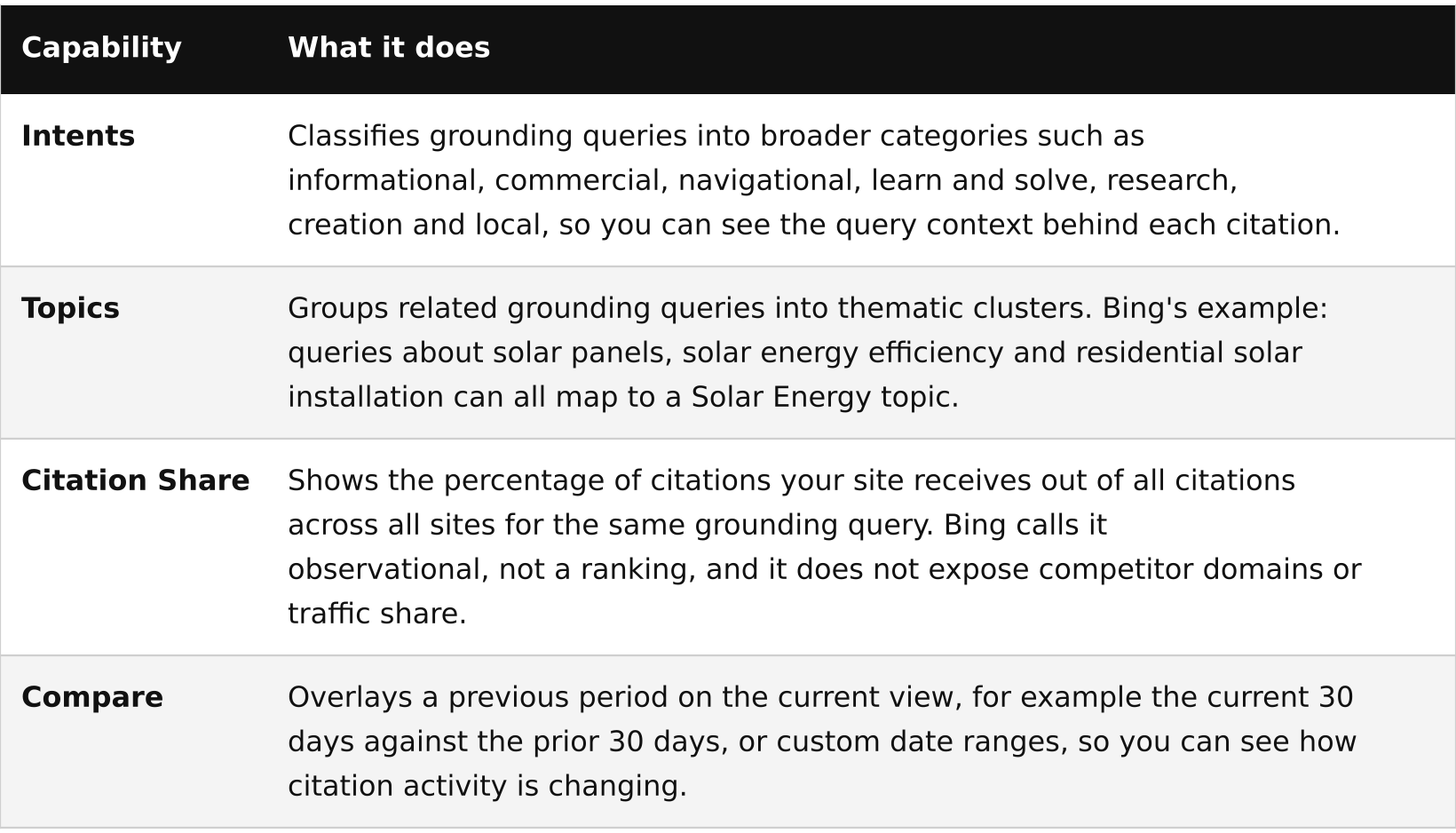
Bing also added an in-dashboard feedback dialog in that release. Topics Portfolio, four months later, takes the Topics idea and turns it into a portfolio view with market context and opportunity queries.
How to find it
- Sign in to Bing Webmaster Tools and select your site.
- Open AI Performance from the left menu.
- Look for the Topics Portfolio tab next to Citations & Pages. It only appears when Bing has sufficient data for your site.
- Choose a 1, 2 or 3 month window. Microsoft suggests starting with the topics where your citations are already concentrated.
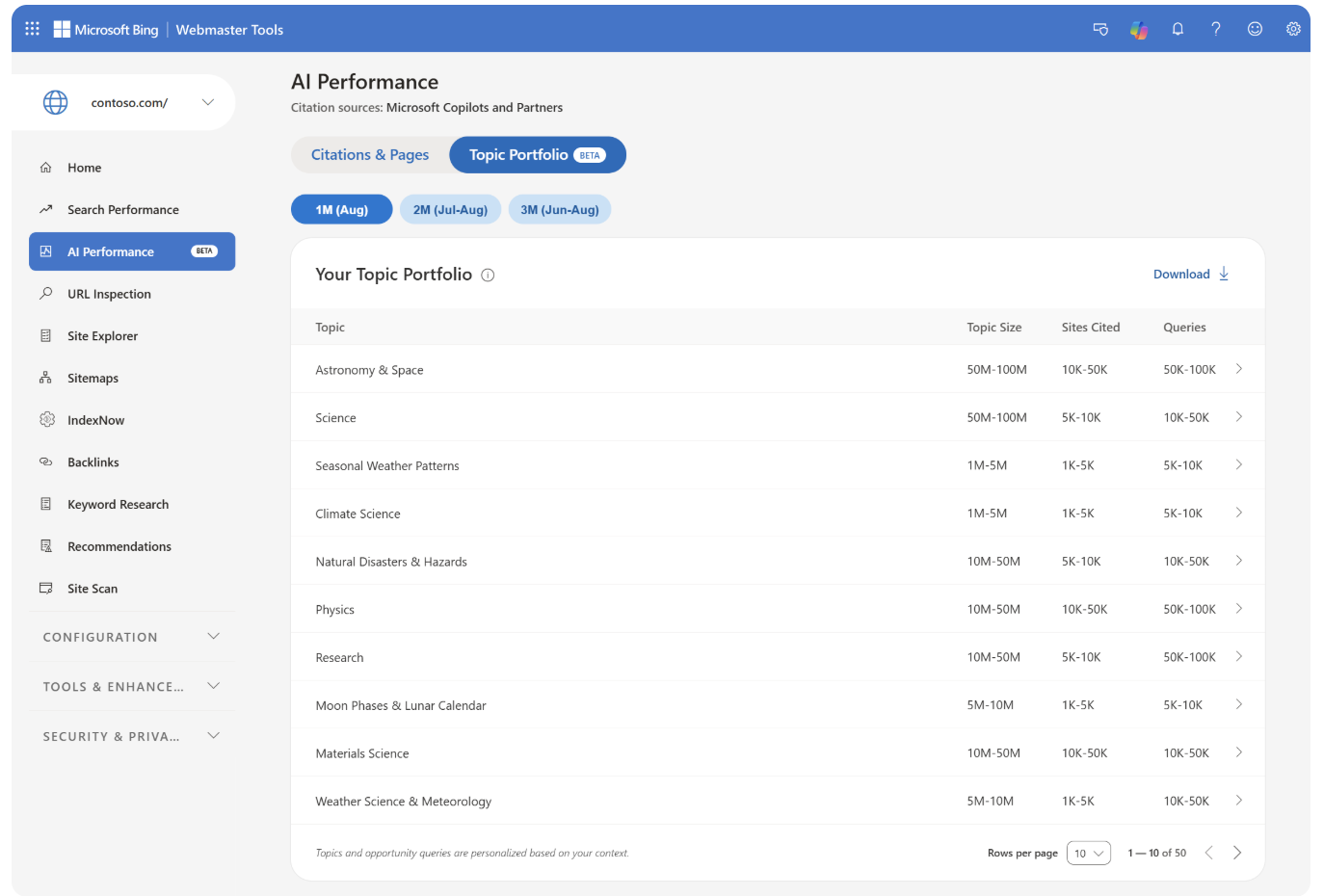
Topics Portfolio landing view in AI Performance. Source: Microsoft Bing Webmaster Blog, 13 October 2026.
How to read the report
The landing page is a list of topics where your site has a meaningful presence. Each topic carries three ecosystem measures, and all three are approximate.
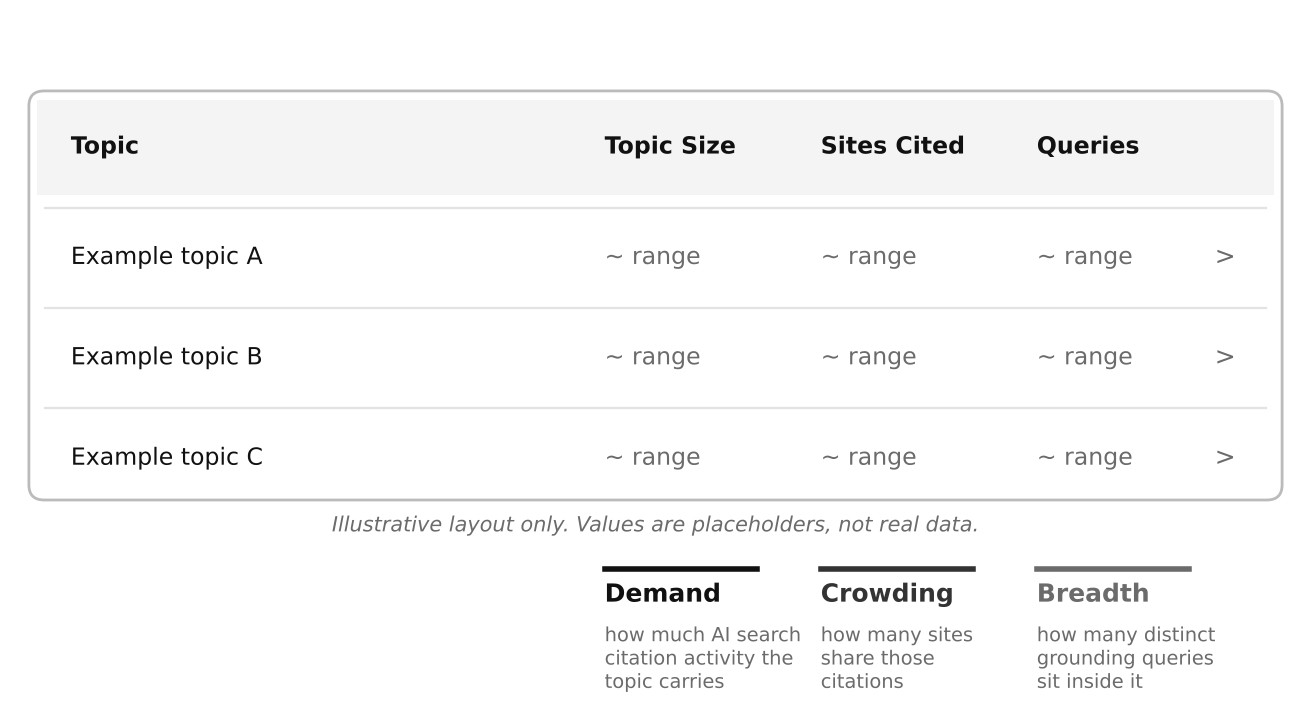
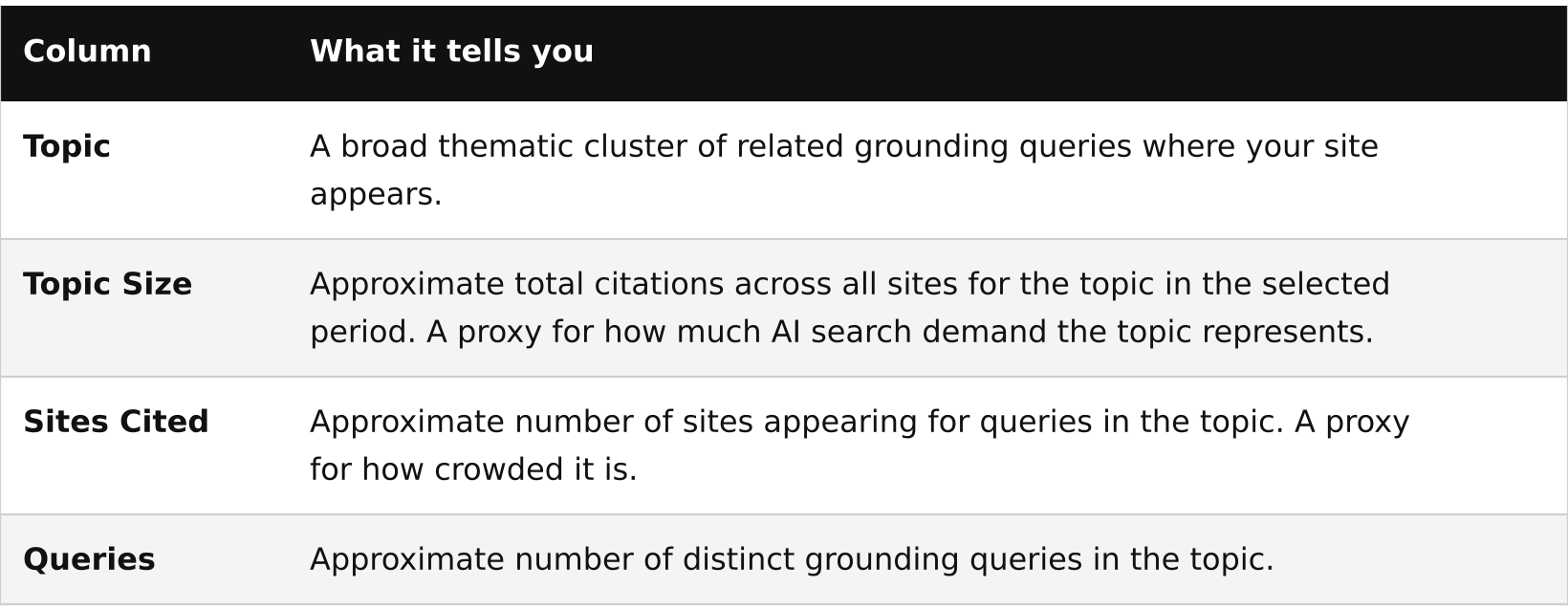
Below the topic table sits Top Opportunity Queries: the strongest queries across your whole portfolio where other sites appear and you do not. It is a fast, cross-topic read on where you could grow. Citation volumes there are shown as ranges, not exact counts.
Inside a topic
Click any topic and you land on a detail page. Three KPI cards sit at the top: the Topic Size, your own citations within the topic and the number of queries. Under them, the queries are split into two tables.
- Your Grounding Queries lists the top queries in the topic where your site already appears, aligned with what you know from Citations & Pages.
- Opportunity Queries lists the top queries in the same topic where other sites appear and yours does not.
Together they show the two halves of a topic: what you already own and what is still open.
Reading the four signals together
Bing presents Intents, Topics, Citation Share, Compare and now Topics Portfolio as separate views. In practice they answer different questions, and the useful work starts when you combine them. This framing is mine, not Microsoft’s.
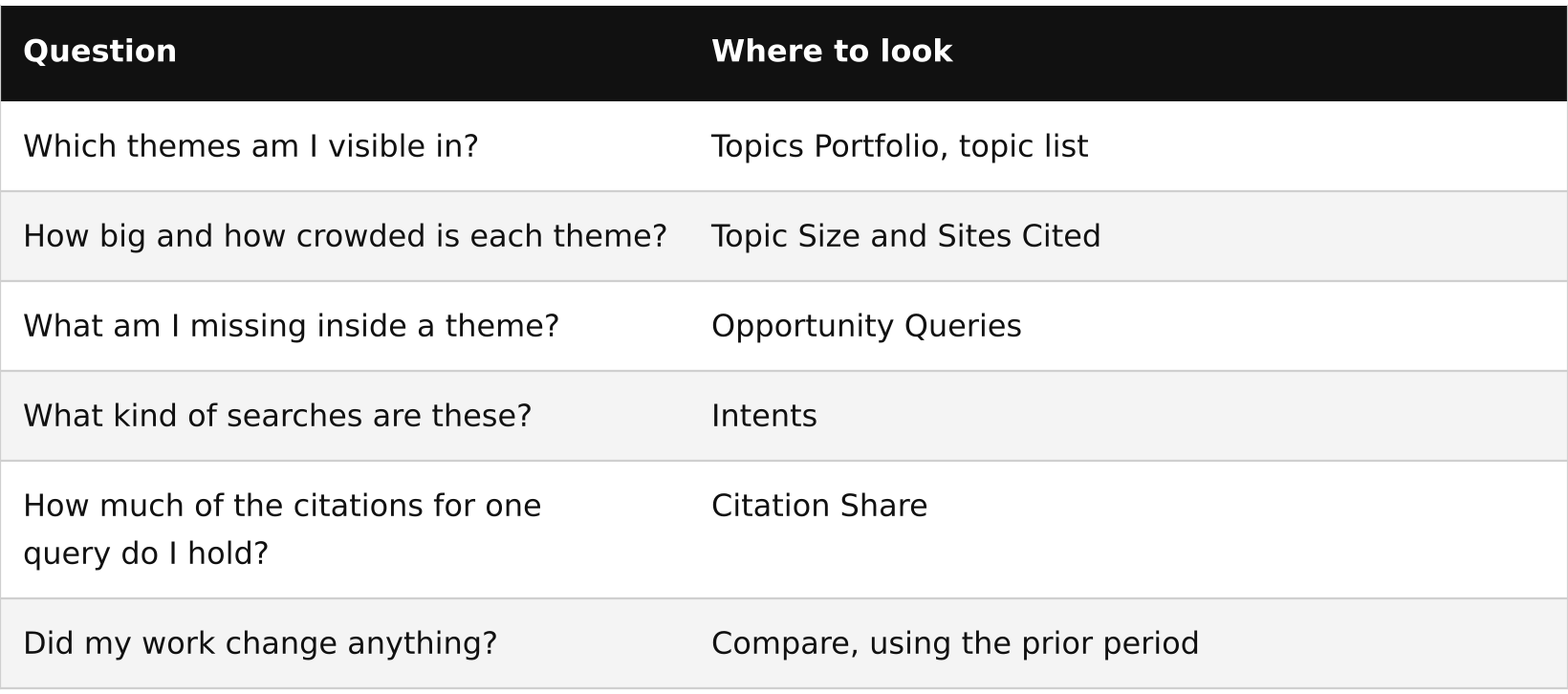
A simple way to shortlist topics
Because Topic Size and Sites Cited are both ranges, you cannot calculate anything precise from them. But you can sort topics into four rough buckets. Treat this as a planning heuristic, not a Bing metric.
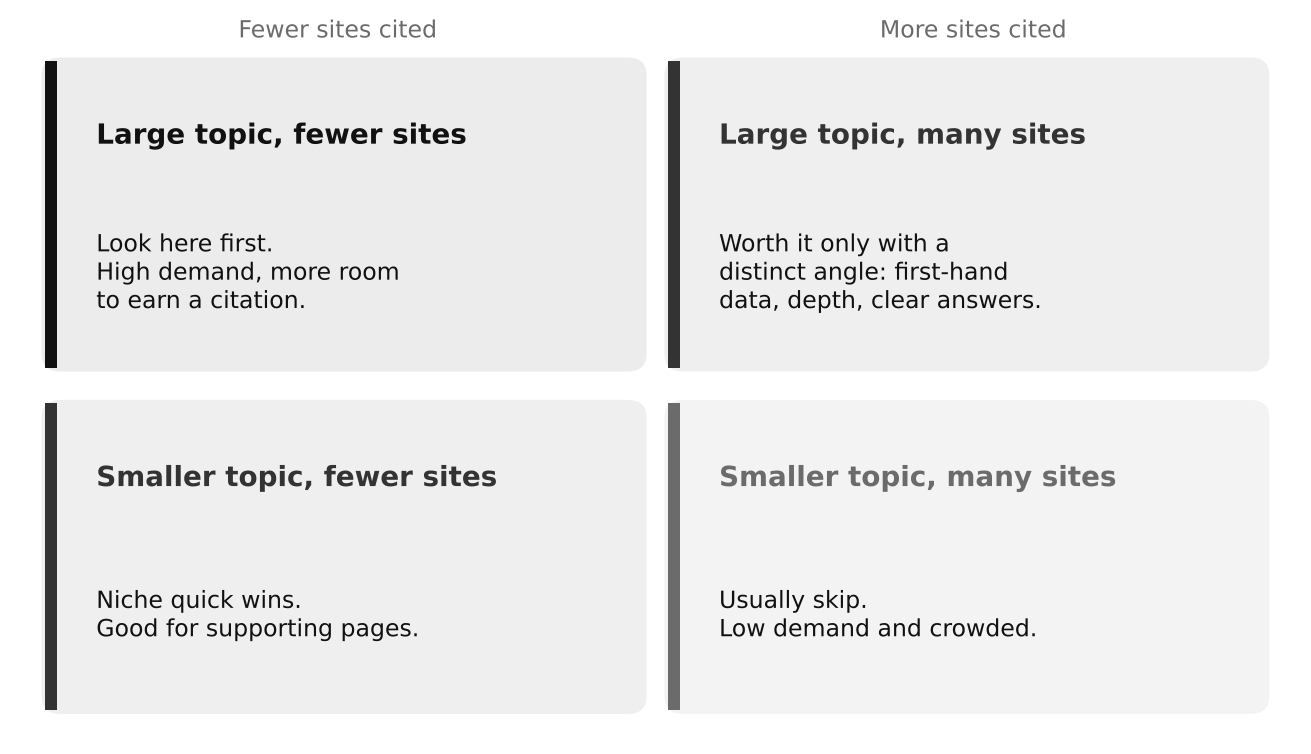
A rough shortlisting matrix based on Topic Size and Sites Cited. Heuristic by the author.
Compare is worth pairing with any content change you make. After you publish or update a page for an opportunity query, check the same window against the prior period instead of judging from a single snapshot.
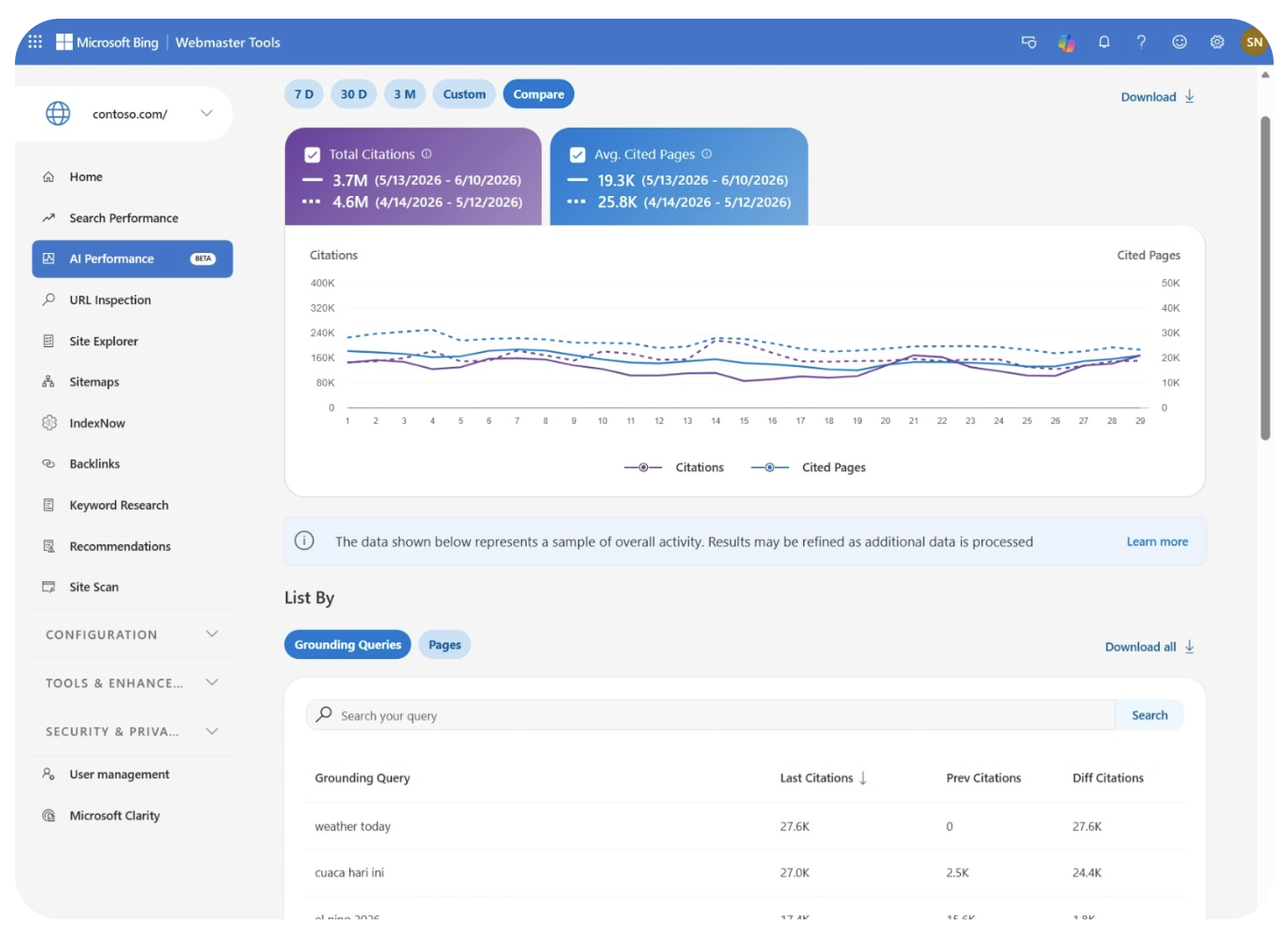
Figure 4. The Compare view overlays a previous period on the current one. Image credit: Microsoft Bing.
Why this is really a query fan-out tool
Google calls it query fan-out. Bing calls it grounding. In both cases a single user question is split into several narrower searches, and the final answer is assembled from the pages that come back.
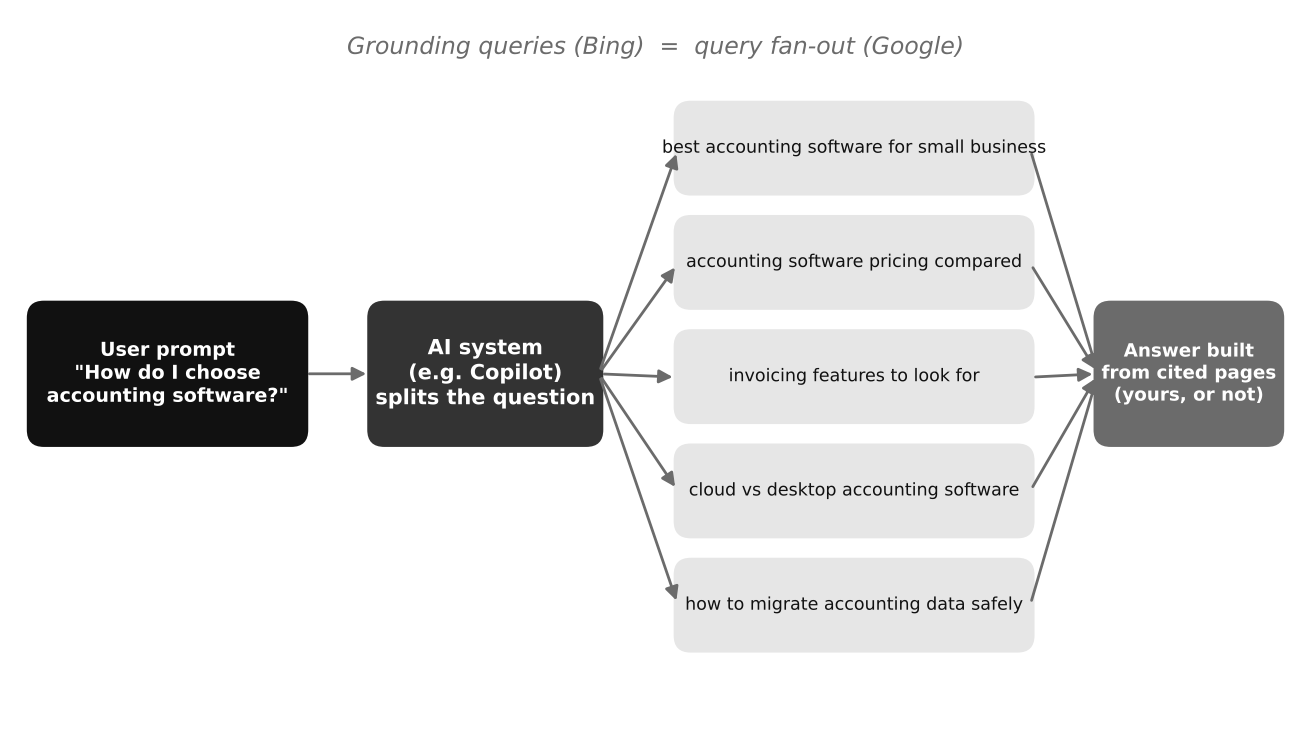
Figure 5. How one prompt can fan out. The sub-queries are illustrative examples written by the author, not Bing data.
Topics Portfolio shows that process from the receiving end. An opportunity query is, in effect, a sub-question the system asked where another site’s page was good enough to be cited and yours was not found or not chosen. If you cover the head topic but none of its sub-questions, you can hold the broad term and still lose the citation.
Here is how I would group sub-queries once exported, using the same accounting software example:
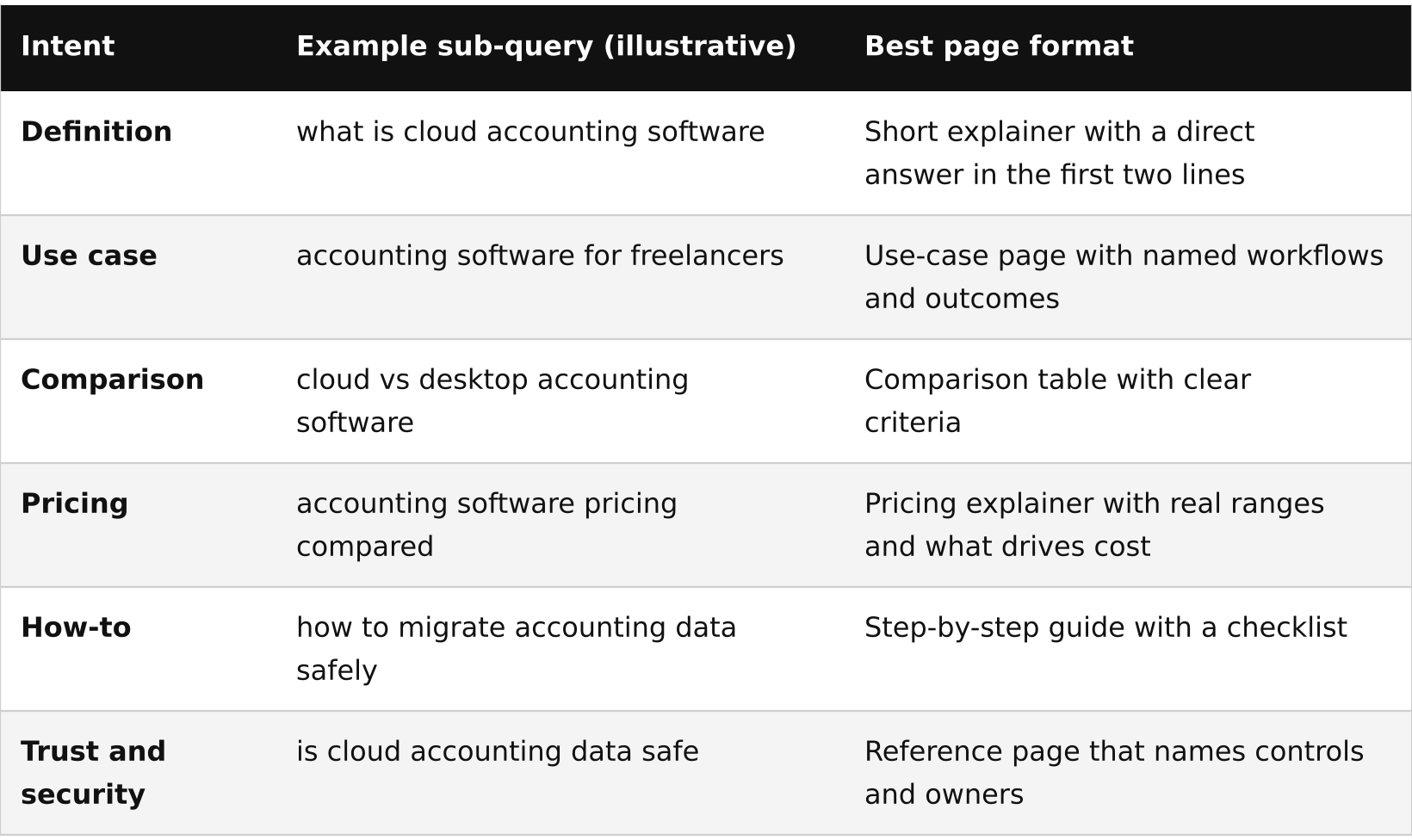
Bing’s Intents labels (informational, commercial, research, creation and so on) are a useful cross-check here. If an opportunity cluster is mostly commercial, a how-to page is the wrong answer.
A practical playbook
Microsoft’s own guidance is to start where your citations already cluster and then work down the opportunity queries. These are the steps I would add on top:
- Shortlist two or three topics. Use Topic Size for demand and Sites Cited for crowding. Skip anything too broad to describe in one page.
- Export the opportunity queries. The Download option is available on both tables.
- Remove branded noise. Microsoft notes that branded queries can appear as opportunities. Delete competitor-name queries.
- Group by intent. Use a table like the one above so each cluster maps to one page.
- Write for retrieval. Put a direct answer near the top, name the author, add a real example or first-hand data, and keep one page focused on one cluster.
- Vote in the tool. Every topic row and opportunity query has a thumbs up and thumbs down. Microsoft says this feedback goes straight to the team fixing classification.
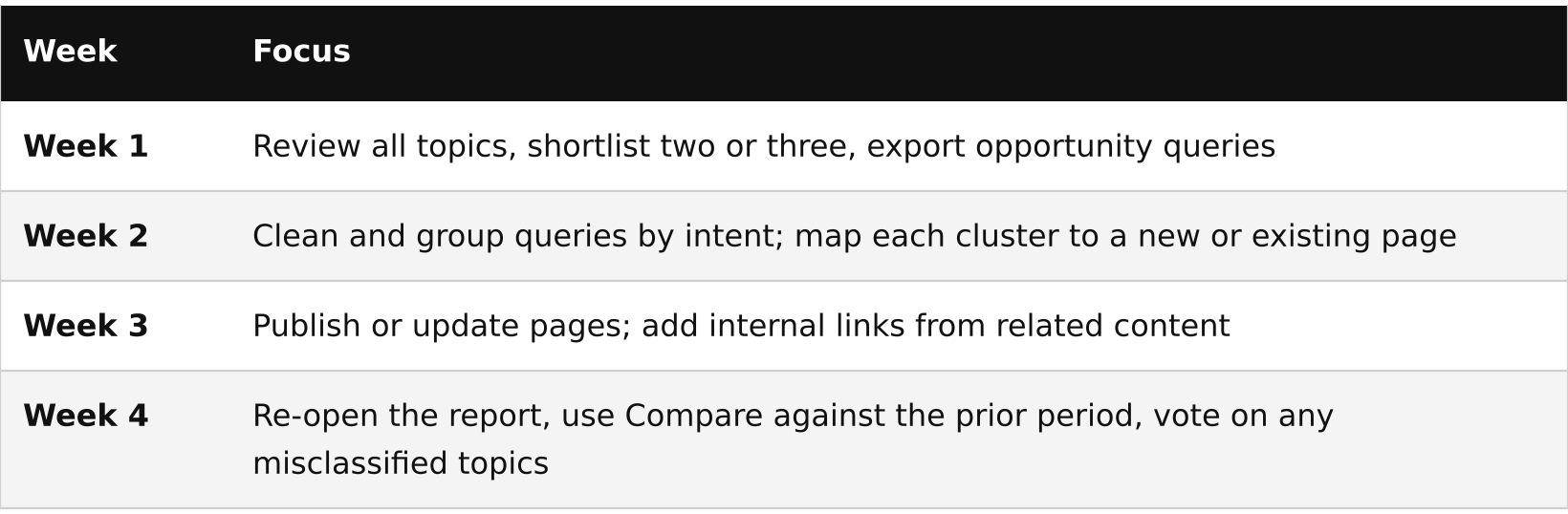
- Re-check in 30 days. Use the same window, and use Compare to see the change against the prior period.
A simple 30-day rhythm looks like this:
What to keep in mind
Microsoft is upfront that this is a beta. Its advice is to treat the numbers as directional signals for planning, not as a precise ledger. Specifically:
- Classification is AI-generated. A query can land under a topic you would have labelled differently. In June, Bing also noted that labels can be broad for specialised or niche domains.
- Thin topics are hidden. Topics with insufficient site presence or ecosystem activity are not shown, so smaller sites may see a short list or no tab at all.
- Branded queries can show up as opportunities. Microsoft’s own example is a shoe brand seeing a competitor’s branded query listed.
- Everything is approximate. Topic Size, Sites Cited and Queries are estimates, and opportunity citation volumes are deliberately shown as ranges.
- Citation Share is not a ranking. Bing describes it as an observational metric. It does not show competitor domains or traffic share.
- Scope is Microsoft’s AI surfaces. The report covers Copilot, Bing and select partner AI experiences. It does not describe ChatGPT or Google AI Overviews, so use it as one signal among several.
Frequently asked questions
Is Topics Portfolio available to every site?
No. Bing shows the tab only when there is sufficient data for your site. Smaller sites may see a shorter list or not see the feature.
Are the numbers exact?
No. Topic Size, Sites Cited and Queries are approximate, and opportunity citation volumes are given as ranges.
What are opportunity queries?
They are queries where other sites are cited in AI answers and yours is not, listed across your whole portfolio and inside each topic.
How is this different from the Topics feature added in June?
June’s Topics grouped grounding queries into thematic clusters. Topics Portfolio, per Bing’s October post, adds the broader view: how big and how crowded each topic is, and the opportunity queries inside it.
Does this replace my ranking reports?
No. It reflects citations in Microsoft’s AI experiences. It complements Search Performance and other tools rather than replacing them.
The bottom line
Most AI visibility reports tell you how you are doing. Topics Portfolio tells you what is being asked and answered without you. It is beta, the numbers are blurry and the classification will sometimes be wrong. Even so, for editorial planning it is already enough to act on, and with Intents, Citation Share and Compare alongside it, Bing’s report is turning into a genuine content-planning tool.